Charge on Solar — Prioritize Powerwall
Keep Tesla’s Charge on Solar charging your car from surplus — but fill your Powerwall to a target you choose first, without giving up your ability to use the battery in the evening.
What it does
When your Tesla is charging on excess solar, SolDial holds it — pausing charging — until your Powerwall reaches a state of charge you set. Then it releases the car so Tesla’s Charge on Solar fills it from the remaining surplus. Your battery ends the sunny day full and your car charges on the sun.
It layers on top of Tesla’s own Charge on Solar. It never changes your Tesla settings, and it never touches the everyday charge to your car’s normal limit — it only decides when the solar-only part of your car’s charge happens.
The problem it solves
In Self-Powered mode, Tesla’s Charge on Solar tends to fill your car before topping off your Powerwall. Once the battery passes your backup-reserve floor, surplus solar flows to the car — so on a sunny day the car fills up while the Powerwall sits half-empty, and you buy grid power that evening.
You might think you could just raise your backup reserve to force the battery to fill first. But backup reserve does two jobs with one slider: it sets how full the battery charges for backup and the floor below which the battery refuses to discharge. Set it to 90% and your Powerwall charges to 90% first — but it also won’t discharge below 90%, so it never actually powers your home in the evening. You’ve traded one problem for another.
SolDial pulls those two apart. Keep a normal, low reserve so the battery still discharges for evening or peak-rate use, and set a separate, higher solar-charge target the battery fills to before the car. Tesla has no setting for this — SolDial adds it.
Who it’s for
- Great fit: you run a normal backup reserve (say 20–30%) so the battery is available in the evening, but on sunny days you want the Powerwall charged high before your car soaks up the sun.
- You may not need it: if your backup reserve is already set above your Powerwall’s current level, Tesla is already prioritizing the battery on its own — this feature stays out of the way until your reserve is lower.
How it works
SolDial watches your live system every few seconds and manages one thing — the car’s solar charging — through a simple cycle:
- Fill the Powerwall first. While the car is charging on solar above its everyday limit and the Powerwall is below your target, SolDial pauses the car so the surplus goes to the battery.
- Release the car. The moment the Powerwall reaches your target, SolDial resumes the car and hands solar priority back to it.
- Hands off until it’s done. Once released, SolDial leaves the car alone for the rest of that charging session — it won’t bounce it on and off if the battery dips a little. The next sunny day starts the cycle fresh.
Two things it will never do: it never interrupts the everyday baseline charge to your car’s normal limit (charging from any source up to your “charge to here” level is untouched), and it never acts on a car charging away from home — only your own home system is ever involved.
Setting it up
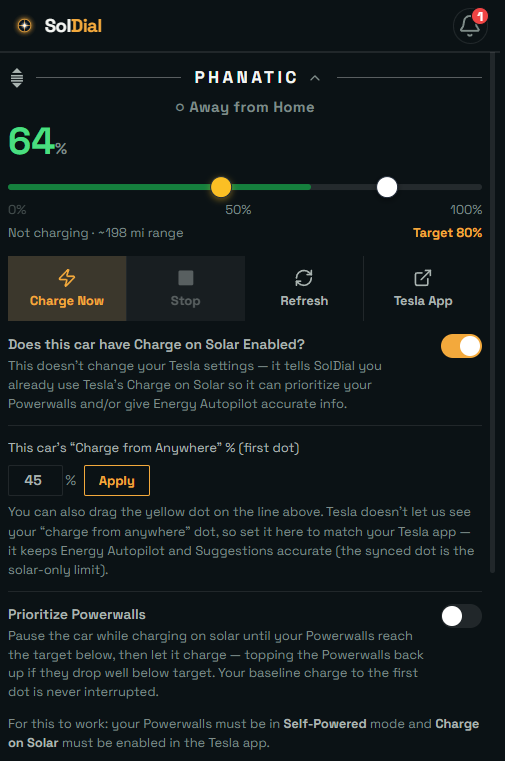
On the Cars tab, open the vehicle’s card and find Charge on Solar:
- Turn on Does this car have Charge on Solar Enabled? This tells SolDial you already use Tesla’s Charge on Solar — it does not change anything in the Tesla app. (Tesla doesn’t report whether the feature is on, so SolDial asks you.)
- Turn on Prioritize Powerwall.
- Set Charge on Solar once Powerwall reaches __% — the battery level to reach before the car charges. It’s a single target shared across all your vehicles, because they all draw on the same Powerwall system.
- Tell SolDial your “Charge from Anywhere” % — the first (lower) dot in the Tesla app’s charge slider. Type it in and tap Apply, or drag the yellow dot on the car’s charge line to match. See below for why it helps.
Your “Charge from Anywhere” setting
With Charge on Solar on, your car’s charge slider in the Tesla app has two dots: a lower one (“charge from anywhere” — the level your car always reaches from any source) and a higher one (the solar-only ceiling). Tesla only lets apps read the higher dot, so SolDial asks you for the lower one.
Setting it is optional — prioritizing your Powerwall works either way. But telling SolDial your first dot keeps Energy Autopilot and Suggestions accurate: they’ll use your car’s real everyday charge target instead of mistaking the solar-only ceiling for it. Enter the percent and tap Apply, or drag the yellow dot on the car’s charge line — the two stay in sync. As with the toggles, this never changes anything in Tesla; it just tells SolDial what you’ve already set there.
Requirements
- A Tesla Powerwall, with your system in Self-Powered mode.
- Charge on Solar enabled in the Tesla app for the vehicle — SolDial layers on top of it, it doesn’t replace it.
- The vehicle paired to SolDial (needed to pause and resume charging).
- SolDial Pro.
What to expect
When SolDial pauses or resumes the car, Tesla takes a minute or two to redirect the freed solar — you may briefly see surplus export to the grid before the Powerwall ramps up its charging. That lag is Tesla’s, not SolDial’s. And as any battery nears full it charges more gently (a natural taper), so the last few percent fill slowly. Both are normal.