How Savings are calculated
The dashboard's Savings section measures one thing: what your solar and Powerwall saved you versus buying every kWh from the grid.
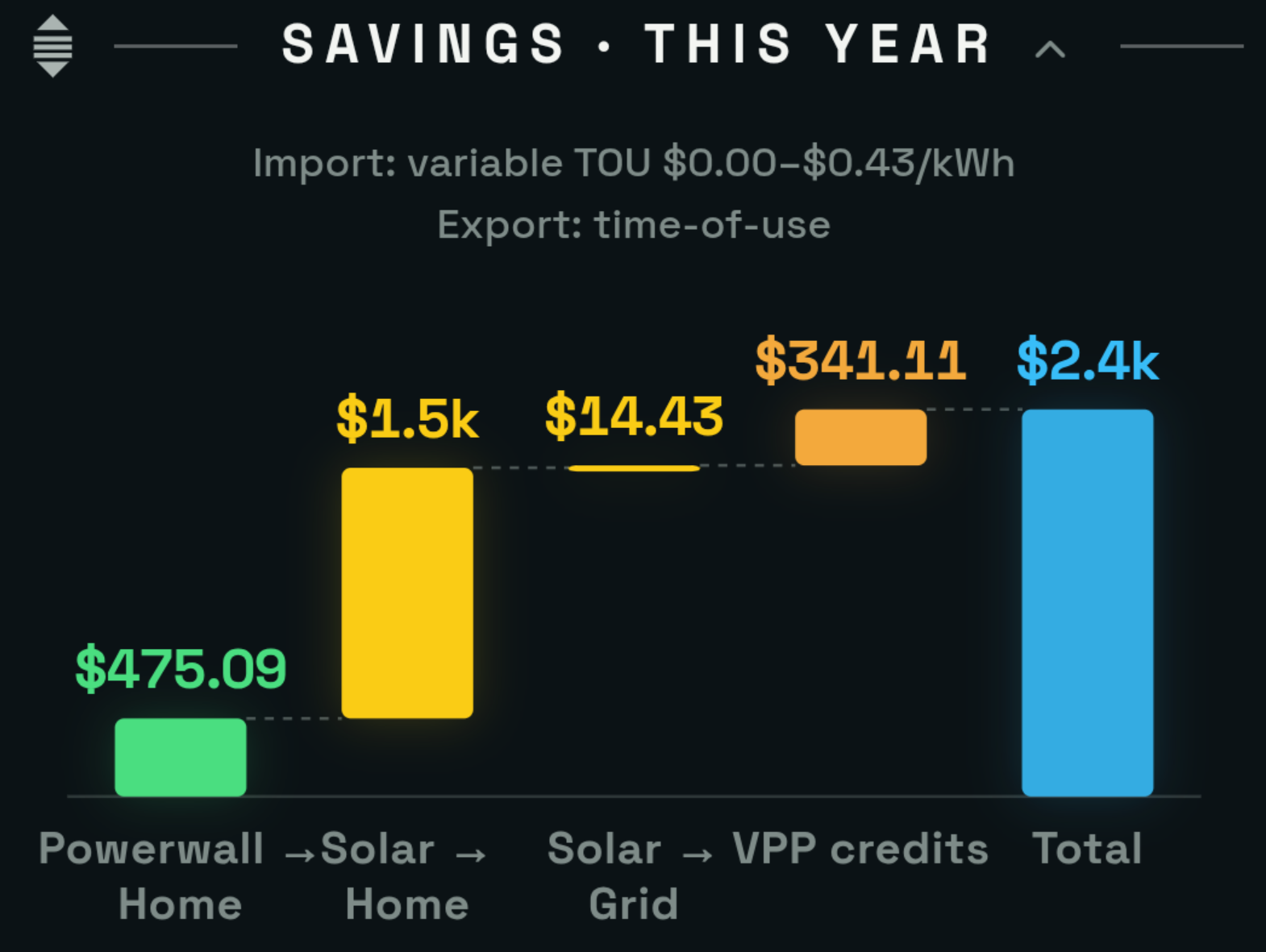
The section this page explains — on the dashboard, under your time filter.
The three buckets
Solar → Home
Solar that ran your house directly, at the moment it was generating — after any solar that was filling a charging battery, which counts toward the Powerwall bucket instead (the same convention the Tesla app uses). It's what you would have paid to buy that same energy from the grid.
solar kWh used by the home that hour × your import rate that hourPowerwall → Home
The energy your battery delivered to the house, valued at the moment you used it, minus what it cost to fill the battery from the grid. That subtraction makes this the honest arbitrage number, not a gross one: fill during a free or cheap window, discharge at peak, and the spread is exactly what shows up here.
battery kWh delivered to the home that hour × import rate that hour− grid kWh that charged the battery that hour × import rate that hour
A day where you deliberately grid-charge a lot — storm prep, a Tesla calibration cycle — can run negative for a while. The chart shows that honestly, in red below the line.
Solar → Grid
The energy you exported, priced by your plan's net-metering scheme — 1:1, net billing at a fixed rate, time-of-use export windows, a variable export tariff like Octopus Outgoing Agile (priced at the actual half-hourly rate), or none.
exported kWh that hour × your export rate that hourTotal
The three buckets added together, plus any plan credits (VPP daily credits and export top-ups), which come from your plan's credit rules rather than from the buckets above.
Stored solar counts as Powerwall
The one rule that surprises people: solar that goes into the Powerwall and comes out later is counted in the Powerwall bucket, not the Solar bucket — and when solar and battery charging happen in the same hour, the solar is treated as filling the battery first, matching the Tesla app. Solar → Home only counts solar consumed the moment it was generated. So on a well-run system the Powerwall bar is often the biggest one — it's carrying your stored solar as well as any cheap grid energy you banked.
How the split is computed
SolDial attributes your energy hour by hour from your system's own meter samples, in your site's timezone. Within each hour:
- Solar serves the home first, then charges the battery, then the car, then exports.
- Grid covers what the battery and the car still needed — only the remainder of your import is attributed to the house.
- The battery gets credit for the part of your home load that solar and grid didn't cover.
Each hour is then priced at the rate actually in force that hour — on a time-of-use plan, a 6 PM battery discharge is valued at your peak rate, not a daily average.
An Australian user checking our math against his own spreadsheet asked exactly the right question, and the check that followed found a real bug. Multi-day views (week, month, year) used to sum the whole period first and split the totals once. Summing first made every solar kWh look like it had powered the house directly — impossible over a year, since much of your solar is stored and used at night — so Solar → Home ran too high, Powerwall → Home too low, and the total could overstate. Single-day views were always computed minute by minute and were correct, which is why a day never quite squared with the year.
As of August 21, 2026, every view splits energy hour by hour and prices each hour at the rate in force at the time. If your numbers shifted around that date — most visibly the split between the Solar and Powerwall bars — that's the correction. Nothing about your actual energy or bills changed, only the accuracy of the credit math. Thanks to the user who pushed on it.