Powerwall devices & health
SolDial breaks your storage down to the individual Powerwall, so you can see how each pack is really doing.
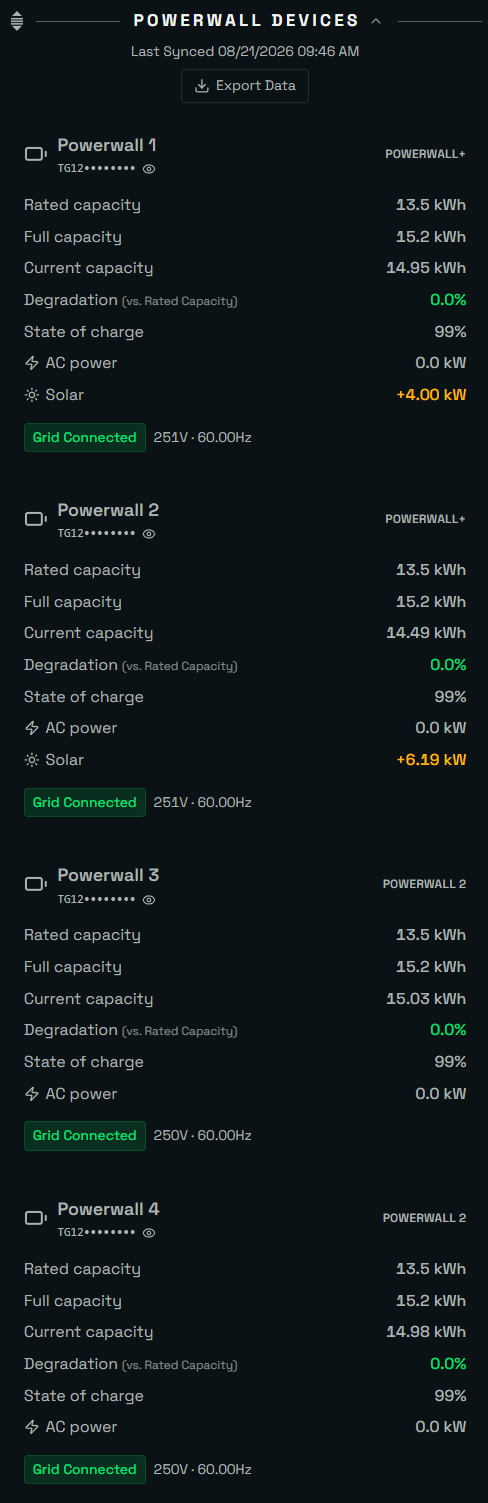
Per-pack vitals
For each Powerwall you get its current charge, usable capacity, and a derived state-of-health relative to its rated capacity — useful for spotting a pack that's degrading faster than its siblings.
Capacity over time
Because SolDial captures nameplate and measured capacity, you can watch real-world capacity trend over months and quantify degradation rather than guessing.
Firmware
The app surfaces your Gateway firmware version so you always know what build you're on.
Grid connection & operational mode
Paired systems get a Go Off-Grid button right in Powerwall Management: disconnect your home from the utility grid on demand and run on your Powerwalls (solar keeps charging them while islanded), then Go Online to reconnect seamlessly. A charge floor keeps you from islanding on a low battery, and SolDial checks your grid state first — if you’re already in the requested state, no command is sent. The same panel includes your Tesla operational mode — Backup-Only, Self-Powered, or Savings — switchable in-app and kept in sync with the Tesla app. Both are also available as automation actions.
Powerwall 2 vs Powerwall 3
SolDial supports both generations. Each unit is rated at 13.5 kWh of usable energy, so per-pack health is measured against that same figure either way. A few differences are worth knowing:
- Capacity reporting. A Powerwall 2 system reports each pack’s energy separately, while a Powerwall 3 reports a single whole-system figure. SolDial reads the Powerwall 3 total correctly instead of multiplying it per unit — so a two-unit Powerwall 3 home shows about 27 kWh, not double that.
- Built-in inverter. Powerwall 3 has its own solar inverter built in, where Powerwall 2 pairs with a separate inverter. Where that detail is available it’s reflected in Solar & per-string detail.
- Local data. Both expose live data to SolDial over your home Wi-Fi through the Tesla Gateway once paired. The read format differs between the two generations, and SolDial handles each automatically.