Building your own automations
Want to build your own? SolDial gives you a full trigger/action engine — and you can create rules just by describing them.
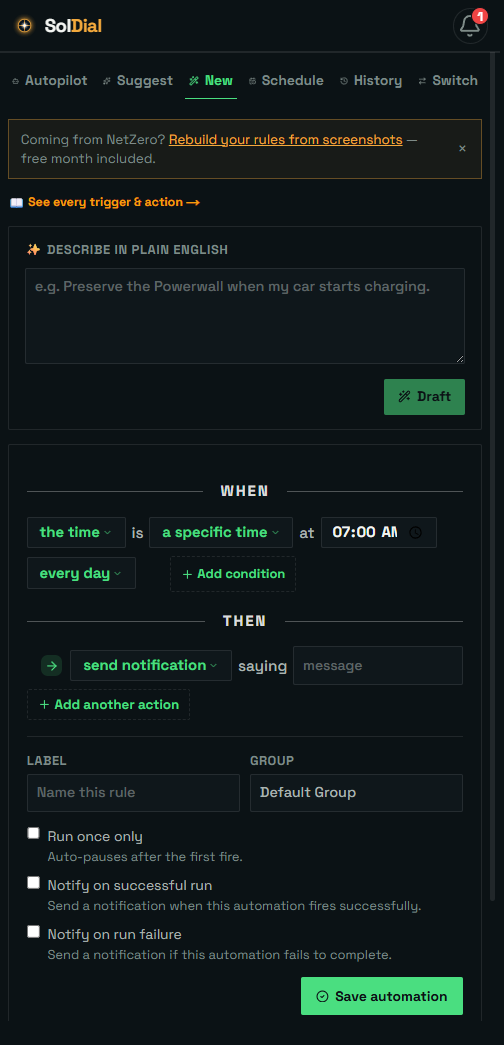
Natural-language creation
Type what you want — "preserve my Powerwall above 80% before stormy days" or "between 4 and 9 PM hold my reserve at 80" — and SolDial compiles it into a real automation you can review and save. When the writer has to reshape part of your request (an end time Tesla can’t schedule, an event-vs-condition rewiring), it says so in a gold note under your description instead of leaving you to wonder. Name a car ("charge Solar Sailer…") and the rule targets that car; if your EV charges from an OCPP wall charger and you have no Tesla vehicle, charging language automatically targets the charger.
Triggers
Fire on a time (a clock moment, sunrise/sunset, or between two times — a start–end window that wraps past midnight, scoped to days of the week), Powerwall charge level, EV state (charging started/stopped, plugged in/unplugged), an EV charger (starts/stops charging, a car plugs in or unplugs, goes offline/comes back), weather forecast, electricity price, grid status, or power flow — and combine 2–3 with AND/OR. Inside a combination, each side is checked as a state ("the grid is offline", "between 10 and 4"), and a combined rule can pin its firing moment: "when the car stops charging while off-grid" fires only at the car-stops moment — the editor shows this as "Fires at the moment: …". The plain-English writer pins automatically whenever your sentence pairs an event with conditions — and a Fires selector on every combined rule lets you choose it yourself: “when all of these become true, any order” (good for start-charging-when-everything-lines-up rules) or “only at the moment” a condition you pick happens.
Actions
Set backup reserve, set operational mode, preserve battery charge, start/stop vehicle charging, start/stop an EV wall charger, set a charge limit, schedule charge windows or a ready-by time, send a notification — and, within your permission, set grid export or grid charging. Charge-starts are plug-aware: if nothing is plugged in when the rule fires (car or charger), SolDial skips the start honestly instead of failing — and the “is plugged in” condition lets you build that guard into the rule itself.
History shows what changed
Every time a rule fires it’s logged in your Automation history with the time, the outcome, and why it fired — the value each condition saw at that moment, such as “Solar estimate for today 49 kWh — at or above 40 kWh” or “Powerwall 64% — discharged down to 65%”. If the rule sends a “ran” notification, that reason is the message. Tap an entry to see exactly what it changed — for example “Backup reserve: 20% to 100%.” A rule you fire yourself with Run now is tagged Manual test, so a test is never confused with an automatic action.