Hourly (real-time) pricing
Some utilities bill a price that changes every hour with the wholesale market instead of a fixed rate or time-of-use windows. SolDial supports these plans natively — ComEd Hourly Pricing and Ameren Illinois Power Smart Pricing — watching the live price for you and acting on it.
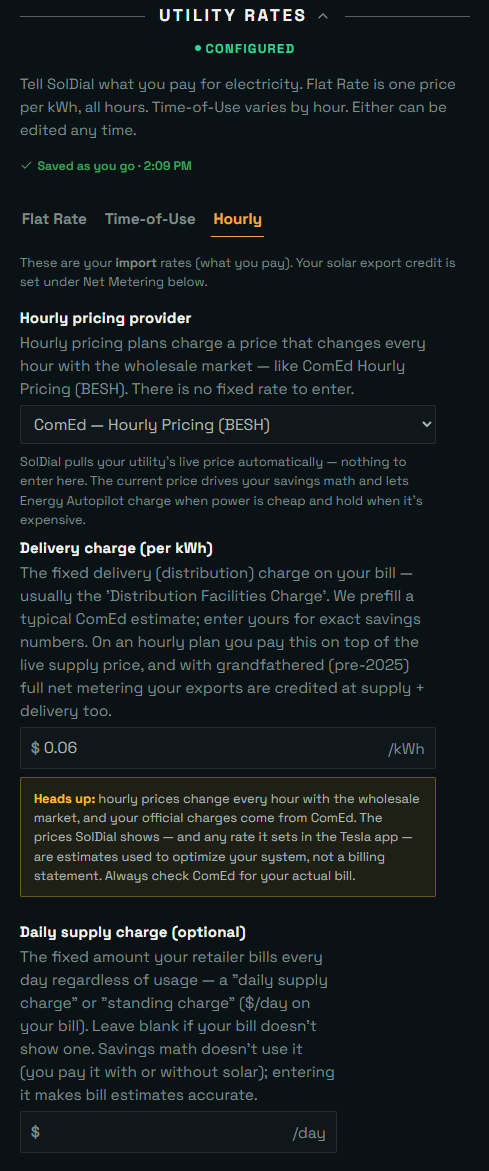
What an hourly plan is
On ComEd’s Hourly Pricing program (also called residential real-time pricing, BESH or RRTP), you pay the market’s hourly average price for supply. Overnight and on windy days power is often very cheap — sometimes near zero — while hot summer evenings can spike far above a flat rate. That volatility is exactly what a Powerwall is built for: fill up when power is cheap, run the house on battery when it isn’t.
Ameren Illinois’s Power Smart Pricing works the same way with one nice twist: its prices are set a day ahead. Each evening the next day’s 24 hourly prices are posted in advance, so tomorrow’s cheap and expensive hours are known tonight.
Setting it up
In Settings → Utility Rates, choose the Hourly plan type and pick your provider — that’s the whole setup. There are no windows or prices to enter: SolDial fills in your utility and plan and pulls the price live from then on. If you look your plan up by zip code and pick an hourly plan like BESH, SolDial recognizes it and switches you to Hourly automatically.
Your export tariff is separate
An hourly import plan says nothing about what you’re paid for what you send back, and the two are usually different products. Set the export side under Net Metering on the same screen.
In the US, real-time plans like ComEd and Ameren net exports against the same hourly supply price, so there’s nothing extra to enter — pick Same as import (1:1) or Net Billing to match your utility. In the UK, choose A separate export tariff (SEG / Outgoing), then pick a fixed rate (Outgoing Fixed, SEG) or Octopus Outgoing Agile for half-hourly export pricing. Agile import with a fixed export tariff, or a fixed import plan with Agile export, are both fine — SolDial prices each side on its own. See Net metering.
Today’s prices on your dashboard
Hourly users get a dashboard section named after their plan. It shows the price right now (color-coded cheap → expensive, with a rising/falling arrow), a curve of today’s actual prices from midnight up to this hour, and today’s low, average, and high — so “is now a good time to run the dryer or charge the car?” is a one-glance answer. These are real prices from your utility’s own feed, never estimates.
Because Ameren posts prices a day ahead, Power Smart Pricing users see more: the section plans the whole day — the cheapest stretch to charge, the peak to ride out on battery — and a Tomorrow tab appears once the next day’s prices post in the evening, so you can see tonight what tomorrow costs.
Automations on the live price
The electricity price trigger works on your live price: fire when it rises above or drops below a threshold you set. Classic hourly-plan rules look like “below 3¢/kWh → charge the Powerwall from the grid” or “above 15¢/kWh → raise self-consumption and ride the battery.” SolDial reacts to a threshold crossing typically within a minute, and your rules’ thresholds are drawn right on the dashboard price curve so you can see where they’ll bite. Grid charging only ever happens if you’ve allowed it in Export & grid-charging permissions, and all the usual guards — backup-reserve floor, cooldowns — still apply. See Building your own automations.
Self-tuning “cheapest slots” rules
Fixed thresholds go stale as the market moves — a number that fit last winter can be unreachable this summer. So a price rule can instead fire when the current price is among the cheapest (or priciest) N slots, and “cheap” and “expensive” recalculate from each day’s real prices automatically. On Ameren (posted a day ahead) that’s the cheapest/priciest N of the whole day; on Octopus Agile it’s the whole UK day, midnight to midnight, as far as Octopus has posted it (the day’s last hour arrives with tomorrow’s prices around 4 PM); on ComEd (real-time) it’s the cheapest/priciest N of your last ~24 hours. A rule can fire when the price enters that set or when it leaves it — “leaves the cheapest N” is how a charge window ends, and unlike a “priciest (the rest)” rule it stays exact on a day that isn’t fully posted yet. No number to set, nothing to re-tune — these are the rules Autopilot builds for you, and they’re shaded right on the price curve so you can see the slots they target.
Autopilot understands hourly plans
Energy Autopilot and Suggestions know an hourly plan has no fixed peak window. Instead of scheduling around clock times, they build self-calibrating price strategies around your Energy Goals — charging into each day’s genuinely cheapest slots and holding the battery for the priciest, adapting automatically as prices move so there are no fixed thresholds to re-tune.