Fast Fill: A Fuller Powerwall From a Short Cheap Window
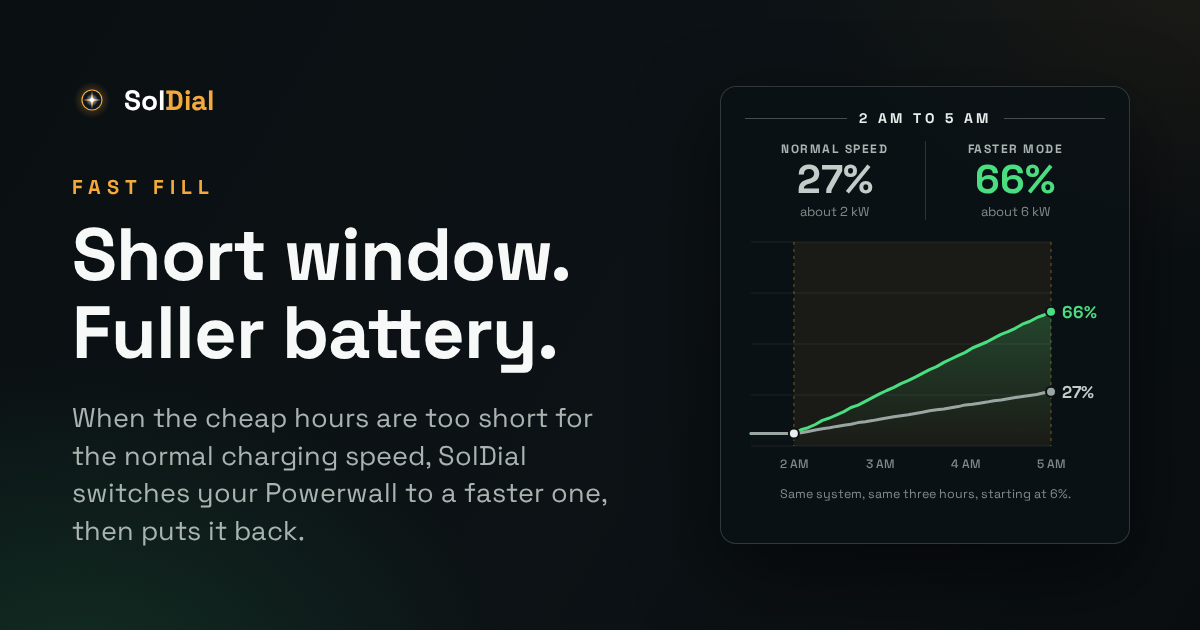
If your electricity is only cheap for a few hours a night, the speed your Powerwall charges at in those hours decides how much cheap power you start the day with. The same three hour window can add about 20 points of charge in one mode and 60 in another, on the same system with the same rule. Fast Fill is the SolDial feature built to close that gap. This post covers what it does, what you will see, and how carefully we switched it on.
On for everyone, November 16, 2026. After watching real overnight charges silently since the end of October, Fast Fill is now switched on for every SolDial Pro account. Fast When Needed is the default, and Normal Speed is one tap away in Settings.
Why a Powerwall Charges Slowly From the Grid
The usual way to fill a Powerwall in a cheap window is a rule that raises the backup reserve. Set it to 100% at the start of the window and the Powerwall charges from the grid to reach it. Lower it again at the end. That is how overnight charging works in SolDial, and in other tools that automate a Powerwall.
What that rule can’t control is the speed. There is no charging speed setting in the Tesla app. The speed comes from the mode the Powerwall is in:
- Self-Powered treats a raised reserve as a backup top up and takes its time. That is typically around 1.7 kW per Powerwall, though some systems charge faster.
- Savings (TOU) fills to the same raised reserve much faster on most systems, typically 3 to 5 kW per Powerwall.
For most of the day that difference doesn’t matter, and Self-Powered is the mode many homes want: the battery runs the house whenever it can. But when the cheap window is three hours long and the battery is nearly empty, the slow speed can’t fill it, however well the rule is written.
Same Window, Two Speeds
Here is what that looks like on a system with two Powerwall 3 units and a cheap window from 2 AM to 5 AM, with the same fill rule in each mode.
- In Savings (TOU) the Powerwalls charged at about 6 kW and gained 60 points.
- In Self-Powered they charged at about 2 kW and went from 6% to 27%.
The chart puts both on the same starting line.
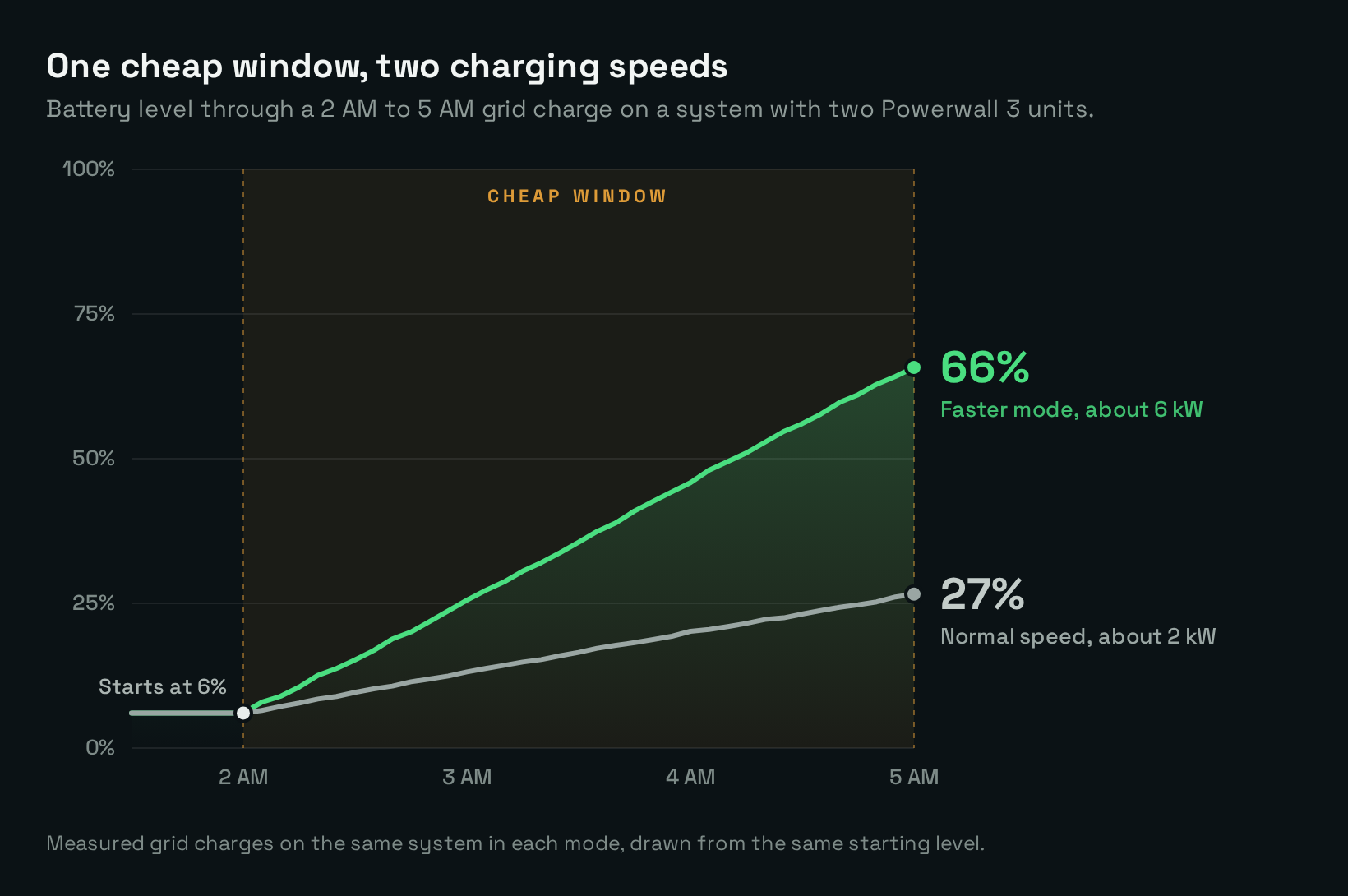
The same system and the same three hours at two speeds. The gap at 5 AM is about 11 kWh that has to be bought later at the day rate.
Two things are worth noticing. The slow charge is not a fault: the rule ran, the grid charge ran, and the Powerwall did what Self-Powered does. And even the fast charge doesn’t reach 100% from nearly empty. Three hours at about 6 kW is roughly 18 kWh, and this battery holds 27. Fast Fill gets you what the window can physically give. It can’t make the window longer.
What Fast Fill Does
Fast Fill puts those two facts together. When one of your rules starts a grid charge, SolDial waits a few minutes, measures how fast the Powerwall is really charging, and runs your Battery Forecast twice: once at that speed and once at the faster one. If the normal speed would leave the battery short, and the extra charge means buying less grid power later, it switches the Powerwall to the faster mode for that charge. When the battery reaches the target, or the window ends, it switches back to the mode you were in.
Your rules don’t change, and nothing is decided in advance. Each charge is judged on its own, with that night’s numbers. Most nights the answer is to leave things alone. It keeps the normal speed when:
- It is on pace. The normal speed gets to the target before the window ends anyway.
- The extra charge would not be used. Tomorrow’s solar would fill the battery, or nothing would draw on it before the next charge.
- Your rates make it a wash. On a flat rate, buying the power sooner saves nothing.
- Your home would pull more than it normally does. A faster charge is extra load on your connection, so by default it stays within the most your home already draws from the grid. If your supply can take more, you can enter your main fuse size.
- Something else is in charge. A battery goal, a rule that sets its own mode, an outage, Tesla’s Storm Watch, a virtual power plant, or a plan with a demand charge.
The faster mode is usually Savings (TOU). If that turns out not to be faster on your system, SolDial notices within minutes, tries Backup instead, and remembers which one works. A rule that charges because a storm or an outage is likely skips the price test, because being full is the point. The Fast Fill guide covers every case.
What You See
Fast Fill is meant to be something you never have to manage, so it shows up in a few small places.
In Automations, any rule it may speed up carries a line saying so. In History, the row under that rule tells the whole charge: why it went faster, at what speed, and when it switched back.
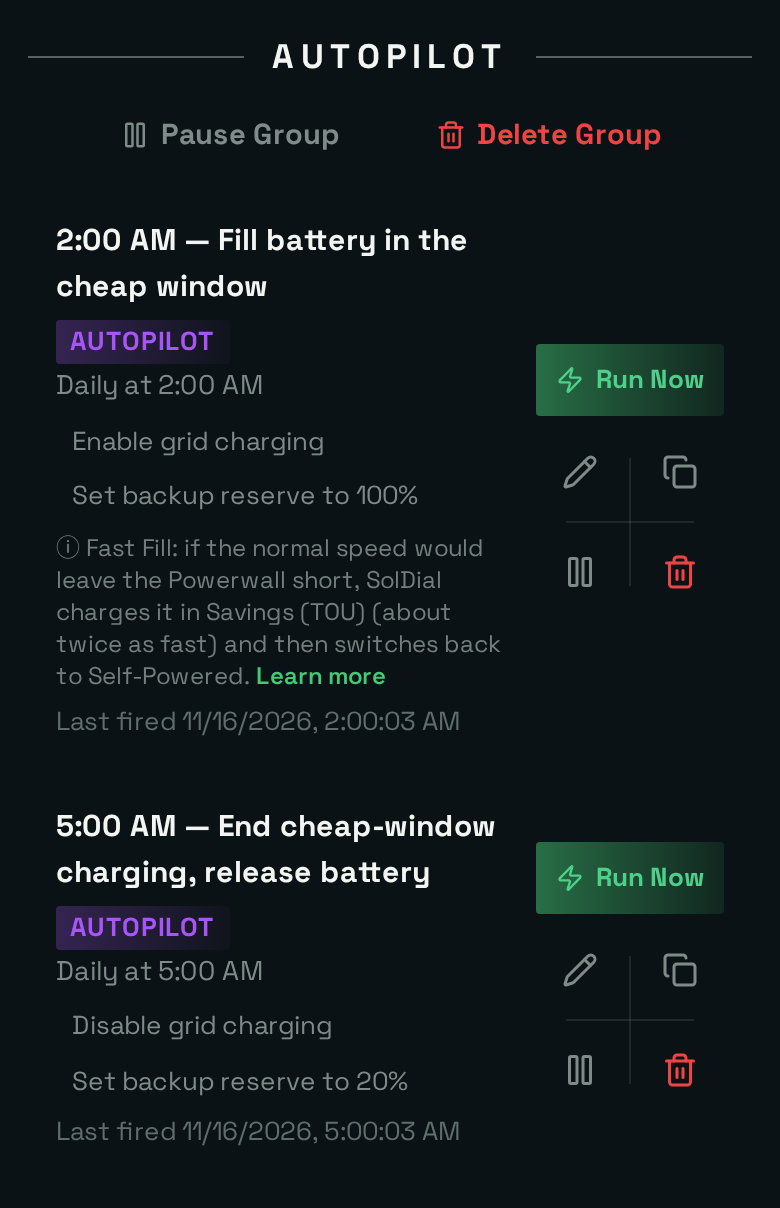
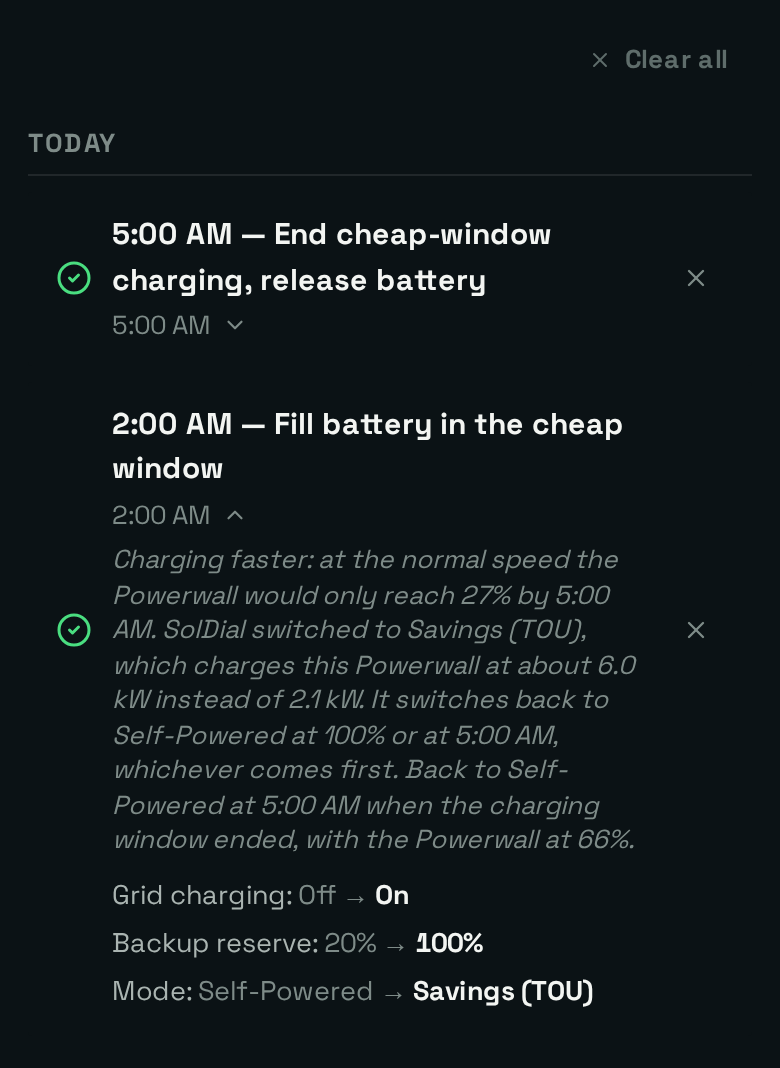
Left: the line on a fill rule. Right: how a faster charge reads in History, using the example above.
In Settings, Charging Speed is where you turn it off, and where you can enter your main fuse size if your supply can take more than your home usually pulls.
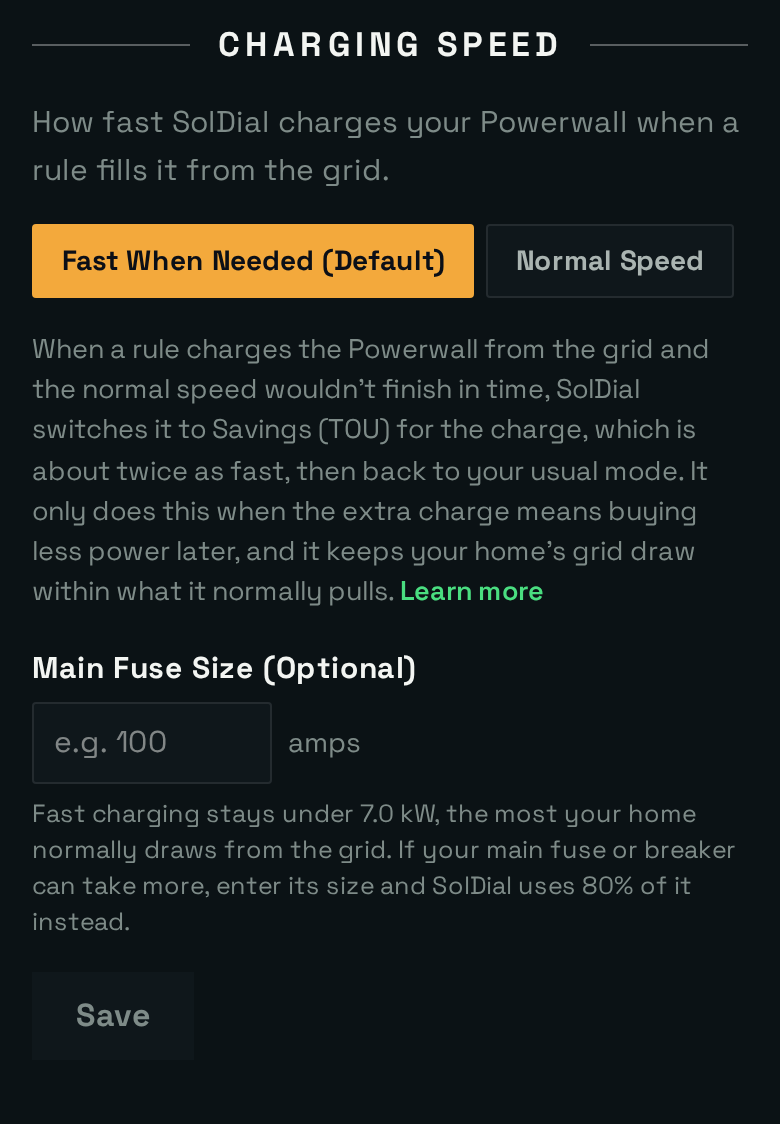
Fast When Needed is the default. Normal Speed means SolDial never changes the mode to charge faster.
The first time it happens you also get one notification, “Your Powerwall charged faster”, saying what it did and where to turn it off. And if you open the Tesla app in the middle of a fast charge, you will see the faster mode there until SolDial switches back.
These show in the app for homes Fast Fill can help: a Powerwall in Self-Powered that is allowed to charge from the grid.
How We Rolled It Out
Changing a Powerwall’s mode at 2 AM, in homes where nobody is awake to notice, is not something to ship on a hunch. So Fast Fill went out in three steps.
1. Rehearsed. Before it touched a real Powerwall, every decision it can make was written as a scripted test: a mode changed by hand part way through, Storm Watch taking over, the grid going down, a large load starting mid charge, Tesla not accepting the switch back. There are 219 of those checks, and they run before every release.
2. Watching silently. From the end of October it ran on real overnight charges in watch only mode, about 170 of them across 17 homes. It measured, decided, and wrote down what it would have done and why. It sent nothing to the Powerwall.
Most charges need no help, and the record shows it holding back for the right reasons: the Powerwall was already in a mode with no faster option, the charge was on pace, the home was in a virtual power plant, the rates made it a wash, or the next day’s solar would cover the rest. Where a short window met a slow charge, it said it would step in. That is what we wanted to see before going further. A feature that changes your Powerwall’s mode should hold back unless it clearly helps, and should be able to say why every time.
The silent weeks also caught a mistake of ours: for its first couple of days it recorded nothing at all, because of a bug that hid the start of a charge from it. In watch only mode that cost nobody anything.
3. On for everyone. On November 16, 2026 it was switched on for every Pro account, with Fast When Needed as the default and Normal Speed one tap away. Every fast charge is written down with its reason, its speed and the moment it switched back, and those records are checked every day. If a switch back does not go through, SolDial tries again, and if it still can’t, it tells you and alerts us.
The Honest Limits
Fast Fill can’t beat the window. If three hours at full speed isn’t enough to fill your battery, you will get more than before, not everything. A longer cheap window or a higher starting level changes that. Fast Fill doesn’t.
It only applies where there is a faster mode to switch to: a Powerwall in Self-Powered, with grid charging allowed, and a rule that raises the reserve. A home already in Savings (TOU) is charging as fast as it will.
And it is new. The charging speeds above are measured, but the first real Fast Fill nights are happening now. We will update this post with what they show.
Read More
The full walkthrough, including a minute by minute night and everything that can change mid charge, is in the guide: Fast Fill. If your cheap window keeps ending with a half full battery, send us a note from Help in the app and we will look at your nights. If you’re new to SolDial, start the free trial.