Powerwall Wrapped
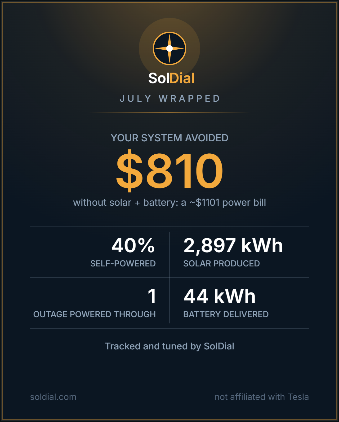
Once a month, SolDial turns your system’s work into one shareable card: what your solar and battery actually did for you, in numbers worth showing off.
When it arrives
Your card is built right after your month ends — midnight in your system’s own timezone, so the numbers cover the true first-to-last of the month — and lands as a push notification and email at 10 AM local time on the 1st. Tap it and the card opens in the app, numbers counting up.
The headline number
The big number is whichever story your month earned. For most homes it’s cost avoidance: what the month’s grid bill would have been with no solar and no battery, minus what the grid actually cost you — priced hour-by-hour against your real rate plan whenever your data supports it, the same honest math the rest of SolDial uses. A near-total self-powered month leads with the percentage instead, and a strong optimization month can lead with what your Powerwall earned dodging peak rates. Every figure is an estimate (that’s the ~ on the bill line), and a Hide $ button swaps the card to the non-dollar story before you share, if you prefer.
The four stats
Self-powered share and solar production are always there. The bottom two cells adapt to what your month actually had: outages powered through (counted from detected grid-outage events), your best self-powered streak, battery delivered, sent to the grid, or your best solar day. The card never pads itself with a zero.
If your month ranked in the top half of the SolDial fleet, the card says so — below that, it stays quiet.
Colorways — the monthly collectible
Each month’s Wrapped carries a named colorway — July Plum starts the collection — and there is exactly one way to earn it: share that month’s card while it’s current. When the next Wrapped arrives, the previous colorway is gone for good.
Apply an earned colorway from Settings → Display → Colorways and your whole dashboard wears it — the dial’s accents, the active tab, gold buttons and links — with a subtle shimmer marking that it’s on. Your card renders in SolDial gold until you’ve applied a colorway; after that, it wears your colors too. Classic is always yours, and switching back is one tap.
Finding it again
Until you’ve opened your card, a reminder line sits on the dashboard. After that, your card lives in Settings → Display → Colorways (tap the current month’s tile) and in the notification bell. Sharing uses your phone’s regular share sheet — on Android that needs app 1.0.8 or newer from Google Play.
Privacy
Nothing is shared unless you share it. The card is rendered on your device, goes only where you send it, and the dollar figure can be hidden first. SolDial only records that a card was shared — never where.